

Agents and MCP
A cortex agent is a JSON manifest on the project's engine fork. Its tools are endpoints on that fork, exposed to the agent as MCP tools and to nothing else. Its process is spawned per conversation turn or per delegated task inside the assistant pod, with no file system, shell or network access of its own; its only capability is the MCP server the platform wrote for it. The same MCP tools and the same agents are reachable by external frameworks over Streamable HTTP with OAuth 2.1 bearers, including bearers a person mints in Settings for a headless client. This page describes the manifest, the runtime, the isolation and the interoperability, with the two architecture diagrams.
The manifest
An agent exists when the fork has an endpoint named cortex.agent.<name>.manifest that returns an object of this shape:
{
  "name": "dq_assistant",
  "display_name": "DQ Assistant",
  "description": "Explains data-quality results and open exceptions.",
  "icon": "shield-check",
  "persona_prompt": "You are the DQ Assistant for this project ...",
  "model": "claude-sonnet-5",
  "tools": [
    { "name": "list_exceptions", "description": "Open exceptions with severity",
      "input_schema": { "type": "object", "properties": { "status": { "type": "string" } } },
      "endpoint": "cortex.dq.exceptions.list" }
  ],
  "guardrails": { "scope": "Data-quality results of this project.", "grounding": "tools", "verify": true, "max_tool_calls": 8 },
  "actor": { "capabilities": {} }
}
Validation is strict (assistant/agent-discovery.js): the name must match the endpoint, display_name and persona_prompt are required, tools must be a non-empty list of well-formed tools, guardrails must validate against the shared rule. A manifest that fails is skipped with a log line; an agent is never half-registered. The manifest is the source of truth; a registry row in cortex_ops (owner, visibility, shares, linked apps and sources) is reconciled from it and carries the access control.
The Agents page edits the manifest as data. Identity, persona, model, the tools list (reword a description, remove a tool, attach an endpoint that already exists on the fork under a new name) and the guardrails block are written back into the manifest endpoint; the write is a version in the fork's history. Tools can only point at endpoints that exist; a manifest can never be made to name code that is not there.
Where the process runs
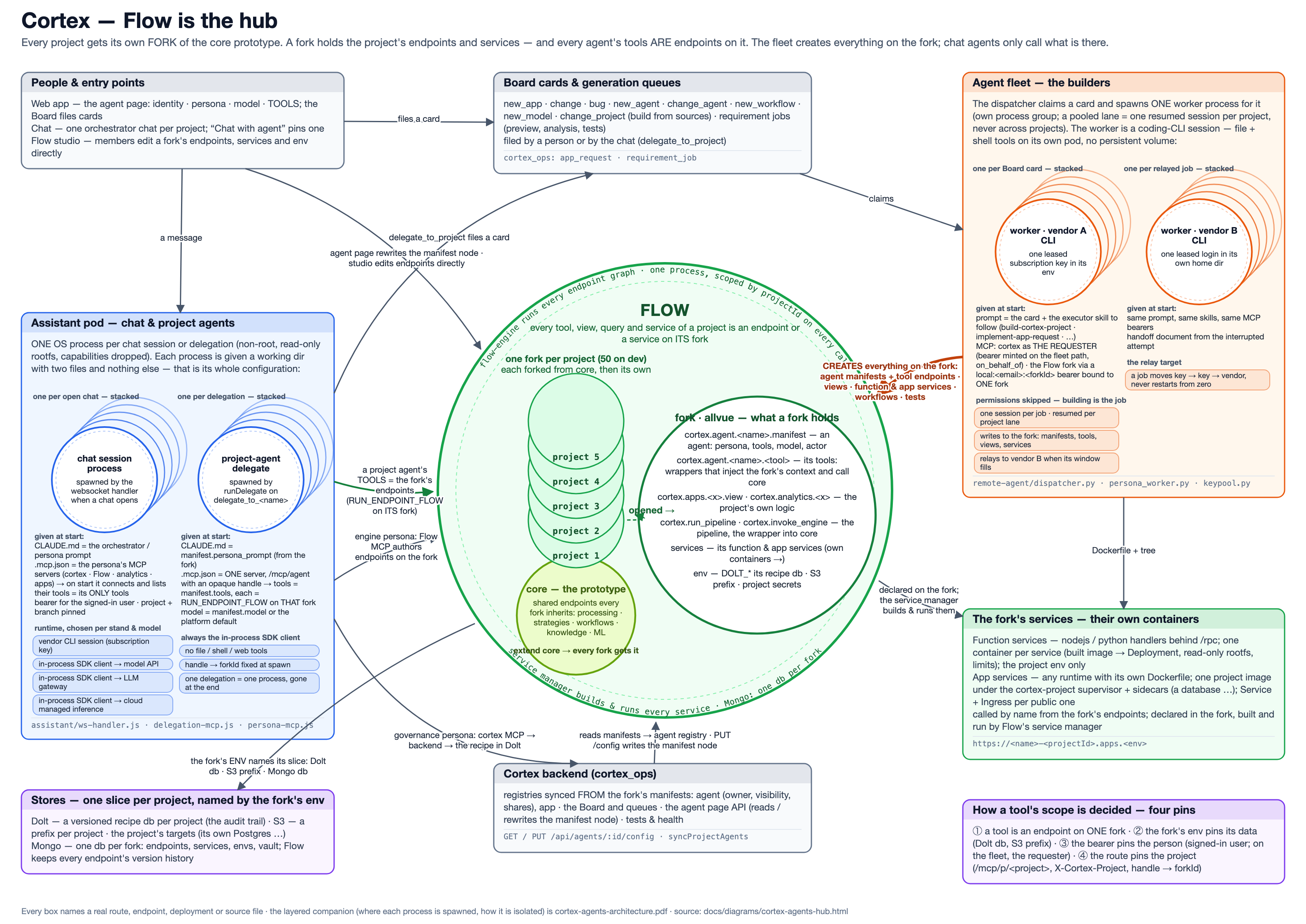
Open as PDF. The layered view: architecture diagram (PNG), PDF.
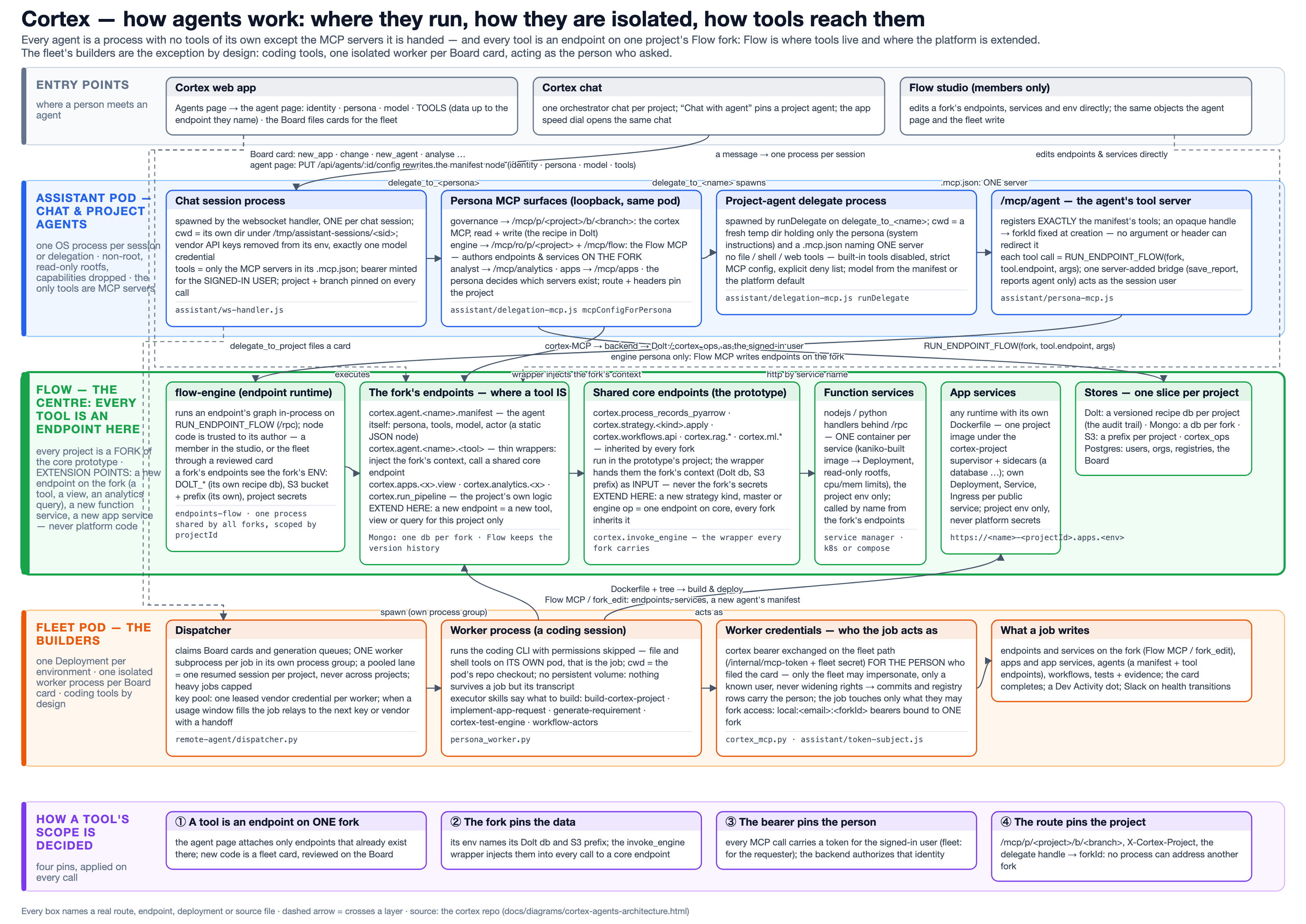
Three kinds of process exist.
Chat sessions. A person's chat in the product is one process per session in the assistant pod: the orchestrator persona with the project's tools and a delegate_to_<agent> tool per visible agent. When a chat is pinned to an agent, the roster is that one agent, enforced by construction (the other agents are absent from the tool list, not merely discouraged).
Project-agent delegates. When the orchestrator delegates, or a pinned agent answers, the platform spawns a child process: the headless agent runtime (assistant/agent/dist/headless.js, a Node bundle using the vendor SDK over the transport the environment has). It runs in a fresh temporary directory whose CLAUDE.md is the agent's persona and guardrail section and whose .mcp.json names exactly one MCP server: the platform's loopback /mcp/agent route with an opaque handle. The handle resolves server-side to the fork and the manifest, so the tool list is never trusted from the child, and the fork id is pinned so a call cannot be redirected to another project. The child has no built-in tools: no shell, no file access, no web. The process is killed at the end of the turn and the directory removed.
Fleet workers. Engineering cards run on the fleet deployment, one coding-CLI process per card in its own process group, against a repository checkout, with a leased model key and a bearer minted on behalf of the person who filed the card (so the audit trail names the person, never the worker). Fleet workers have file and shell access by design; they produce code and evidence, not answers to end users.
Model access is decided per environment, never per agent code: Amazon Bedrock through the pod's IAM role (the production default), an OpenAI-compatible gateway, or a vendor API. An agent may name its model from the platform catalogue; the transport translates the id.
Isolation
| Boundary | Mechanism |
|---|---|
| Agent to tools | Only the manifest's endpoints, resolved server-side by handle; no built-in tools; --restricted, --tools "", explicit deny list and strict MCP config on the CLI path |
| Agent to project | Fork id pinned server-side; every recipe write is a Dolt commit authored by the bearer's email |
| Agent to platform | Loopback-only MCP routes inside the pod; a fork cannot request backend privileges (the one server-added tool is granted to one stamped agent only) |
| Pod | Non-root user, read-only root filesystem, dropped capabilities, session directories under /tmp |
| People to agents | Registry ACL: owner, explicit shares, org visibility; app-embedded chats see only the companions the app owner enabled ("absent, not refused") |
| Access rule | One pure function (shared/access-policy.js) used by the backend, the assistant and the accounts service; fails closed |
The full account is in the internal page "agent isolation and process model"; the mechanisms above are the ones an evaluator can verify in the repository.
MCP surfaces
Cortex is an MCP server. Transport is Streamable HTTP (no SSE transport), authentication is OAuth 2.1 with dynamic client registration and per-route protected-resource metadata, and bearers are stored in cortex_ops and verified on every request.
| Path | What it exposes | Who uses it |
|---|---|---|
/mcp/p/<project>/b/<branch> |
The project's typed governance tools (read and write) | IDE clients, external frameworks |
/mcp/ro/p/<project> |
The same, read-only | Engine-side helpers, cautious integrations |
/mcp/orch/p/<project>/b/<branch> |
The project's agents as tools (delegate_to_<agent>), each answering under its guardrails |
The product chat; external orchestrators |
/mcp/agent (loopback) |
One agent's manifest tools, by handle | The agent's own child process |
/mcp/flow, /mcp/analytics, /mcp/apps (loopback) |
Engine authoring, analytics, app registry | Platform personas inside the pod |
Do you need an orchestration framework?
Not for a project built on cortex. Cortex has its own orchestration layer, business workflows: processes drawn on a canvas with steps assigned to roles, people, agent actors or code, decisions with outcomes, triggers, live runs and a human inbox. An agent actor on a workflow step is what a tool-calling agent node is in a graph framework, with a human gate, a version history and a runs inbox already attached. See Agentic workflows.
AgentCore and LangGraph are supported as neighbours, not required as dependencies. A team that runs them today keeps them and consumes cortex tools and agents over MCP as described below; a team that starts on cortex needs neither.
Connecting an external framework
An interactive client completes the OAuth consent in a browser once. A headless framework cannot, so a signed-in person mints an access token in Settings ("Access tokens for external agent frameworks"): the same bearer an OAuth consent produces, labelled, listed by prefix and revocable. The token carries that person's identity and exactly their access; every MCP route re-derives authorisation from it.
LangGraph / LangChain with langchain-mcp-adapters:
from langchain_mcp_adapters.client import MultiServerMCPClient
client = MultiServerMCPClient({
    "cortex": {
        "transport": "streamable_http",
        "url": "https://<cortex-host>/mcp/p/<project>/b/main",
        "headers": {"Authorization": "Bearer <token>"},
    }
})
tools = await client.get_tools()   # every fork endpoint of the project, typed
Amazon Bedrock AgentCore Gateway: add an MCP target of type Streamable HTTP at the project URL, with outbound authentication as an API key in the Authorization header (Bearer <token>). The project's tools appear as gateway tools. Point a second target at the orchestrator URL to expose the project's agents themselves as tools; each answers under its own guardrails and every answer is recorded in the guardrail ledger.
Any MCP client (Claude Code shown):
claude mcp add --transport http cortex-<project> https://<cortex-host>/mcp/p/<project>/b/main \
  --header "Authorization: Bearer <token>"
The other direction also holds: a cortex agent's tool is an endpoint, and an endpoint can call any HTTP API, including an MCP server or an AgentCore gateway of the customer's. Wrapping an external system as a tool is authoring one endpoint on the fork; the agent manifest then names it.
What an agent costs to add
- Author or reuse the endpoints the agent needs on the fork (or let the fleet do it from a card).
- Write the manifest: persona, tools, model, guardrails. Or press "Add agent" on an app and let the fleet write it.
- Set access on the Agents page.
No adapter code, no configuration plumbing, no deployment. The agent is discovered at the next session open and appears in the chat, on the Agents page and on the orchestrator MCP endpoint.